


BTC Cloud Mining(Crypto Miner)
4.5359.00 Reviews
App Specs
- Version
- 5.0.1
- Updated On
- License
- Free
- Downloads
- 100,000+
- Developer
- MiningCore Cloud
- Categories
- Finance
- Platform
- Android
Screenshots
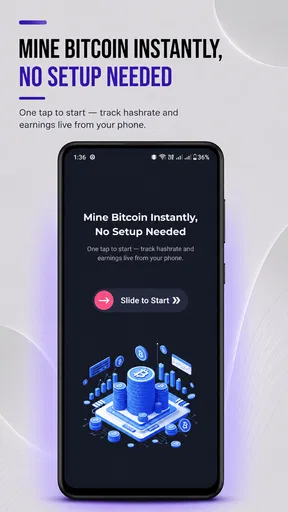
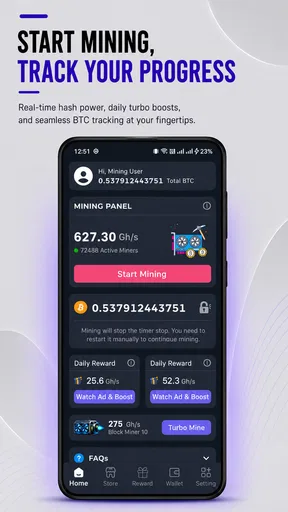
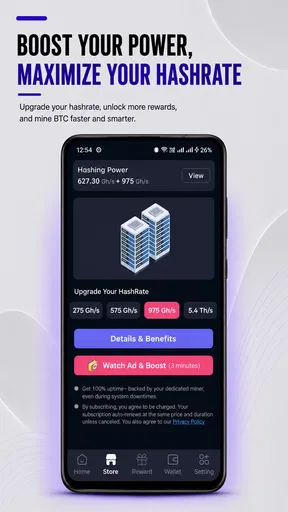
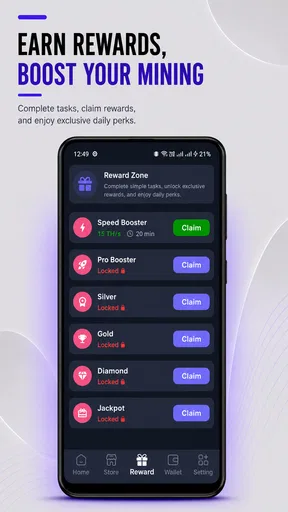
 Analysis by AppCompare
I’d approach BTC Cloud Mining as a finance app to explore cautiously, not as a shortcut to dependable income. Cloud mining can sound simple because the work is presented through a phone, but the decision that matters is still financial: whether paying for a plan makes sense for your budget and expectations. I find the app’s appeal easiest to understand if you treat it as a way to learn about a mining-style service and monitor activity, rather than assuming that a growing balance automatically means a profit.
What “hands-off” means in practice
The app is from MiningCore Cloud, and its focus is Bitcoin cloud mining rather than managing a conventional wallet or helping you buy a broad range of investments. That distinction matters. If your main goal is simply to hold Bitcoin, a familiar exchange or wallet is a more direct tool; if you want to explore a cloud-mining setup without running hardware yourself, this app is closer to what you’re looking for.
Remote operation can remove the need to configure mining equipment at home, but it doesn’t remove the need to understand the plan you choose. Before spending, I’d look carefully at the plan terms shown in the app and make sure I understand what is being purchased, how any displayed earnings are calculated, and what rules apply to withdrawals. Those checks are more useful than judging a service by a dashboard that looks active.
A low-pressure way to evaluate it
If you’re new to crypto, I’d start by exploring the available screens without committing money. The app is free to install, though it offers in-app purchases ranging from $2.49 to $114.99 per item, so “free” describes getting the app rather than every possible activity inside it. Its demo option, as described in the app experience, can be a practical place to learn the interface before deciding whether any paid plan fits your risk tolerance.
A useful personal rule is to decide on a spending limit before opening the purchase screen, then stick to it even if the app makes a higher tier look tempting. I would also avoid treating referral bonuses or projected figures as proof of likely returns. They can be part of an app’s incentive structure, but they should not replace a clear understanding of costs and withdrawal conditions.
Getting Started with BTC Cloud Mining
First off, I have to say that installing BTC Cloud Mining was a breeze. Available on both Android and iOS, it took just a few taps to get started. The interface is clean and user-friendly, which I appreciated as someone who’s not exactly a tech wizard. Once you fire up the app, you’re greeted with a straightforward dashboard that even a newbie can navigate.
Setting up an account didn’t take long, and I was pleasantly surprised to find that the app offers a demo option. This is perfect for anyone who wants to test the waters before diving into the deep end. The demo mode gives you a feel for how mining works, without risking any of your hard-earned cash.
Worth Reading Before You Choose

EA SPORTS FC Mobile 26 Is a Bigger Football Game, but It Takes Time

Flipboard Shows What News Apps Must Do Beyond the Feed

Switching to Android Auto Means Rethinking Your Driving Routine

Google Calendar Makes a Crowded Week Easier to Manage

Ludo King Makes the Most of the Minutes Between Plans

Baby Panda World Brings Quick Play to Modern Phones, but Its Game Library Feels Busy
The Mining Experience
Once I felt comfortable, I switched over to the real deal. The app offers various mining plans, and I decided to start small. There are several tiers to choose from, each with different hash rates and potential returns. It’s kind of like picking the right level in a video game—you get to decide how much risk and reward you’re up for.
The mining process itself was surprisingly hands-off. Unlike traditional mining setups, you don’t need to worry about hardware or electricity costs. The app takes care of everything in the cloud, which is a huge plus for anyone who doesn’t want to deal with the technical side of things. I found myself checking in on my progress throughout the day, eagerly watching those Satoshis pile up.
Speed, attention, and daily use
I wouldn’t choose a cloud-mining app because I expect a phone to make Bitcoin mining fast. The useful question is whether the app makes it easy to review activity and understand what a plan claims to do. A quick glance at the dashboard may be convenient, but a displayed balance is not the same as money you can withdraw or a confirmed return. I’d check the plan details and any withdrawal rules before using the figures to make decisions.
For an ordinary routine, I can imagine opening the app once during a lunch break to review the displayed stats, then leaving it alone until I have time to examine them properly. That is a better fit than repeatedly refreshing the screen or buying a larger plan just because the numbers are changing. A calm check-in helps keep the app in its proper role: a monitoring tool for a financial choice, not a reason to chase movement.
The most useful comparison is with running mining hardware yourself. This cloud approach avoids setting up equipment and dealing with home electricity use, but it also means you are relying on the service and its plan terms rather than controlling a machine directly. Compared with simply buying and holding Bitcoin, mining adds another layer of uncertainty and is not automatically the better route. I’d choose a wallet or exchange for straightforward ownership, and consider cloud mining only if I specifically wanted to explore this model.
Features Worth Noting
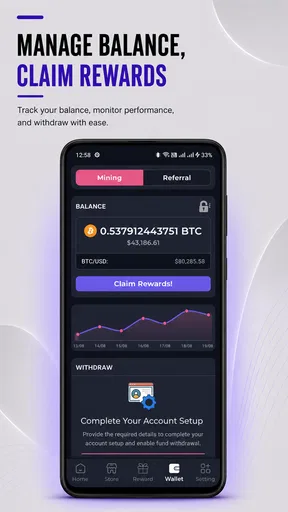
One of the standout features of BTC Cloud Mining is its real-time stats. You can track your earnings and see exactly how your investment is performing. This transparency is crucial, especially in the somewhat murky world of crypto. The app also includes a handy FAQ section and a support chat, so you’re never left hanging if you have questions.
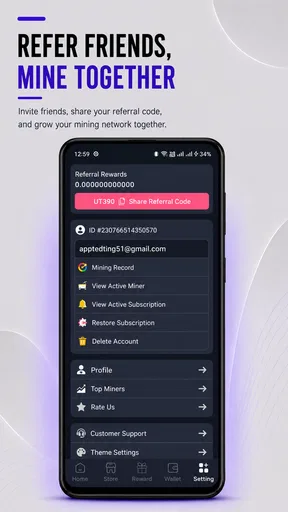
Another cool feature is the referral program. If you’re a social butterfly, you can invite friends to join and earn bonuses on their mining activities. It’s a win-win situation, and who doesn’t love a little extra incentive?
Using the numbers thoughtfully
Stats are most useful when I compare them with the cost and terms of the plan, rather than reading a rising figure in isolation. I’d note what the app shows before and after a session, then check whether the same screen explains how the figures relate to the plan. If a number is unclear, I’d ask support before paying more; a support chat is valuable only when it helps answer a concrete question, such as what a displayed balance represents.
The referral option also deserves a little restraint. It may suit someone who already discusses crypto with friends, but I wouldn’t invite people based on an expectation that they will earn money. A referral incentive is not a substitute for explaining the costs and risks plainly, and it should never be the main reason to sign up or purchase a plan.
Reliability and trust
A finance app needs to be judged by more than whether it opens smoothly. I’d want to see consistent access to the account and clear, understandable figures before trusting it with repeated use. If the dashboard seems delayed or a balance changes in a way I can’t explain, I’d pause any further spending and seek clarification rather than assuming the display guarantees a payout.
BTC Cloud Mining has an average rating of 4.1 from around 11,000 ratings, alongside 329 written reviews. That gives a prospective user a broad snapshot of other users’ reactions, but ratings alone cannot establish that a particular plan is right for you. I’d read recent comments for recurring concerns and compare them with the terms inside the app, rather than treating popularity as a promise of performance.
There is also a practical distinction between app availability and financial reliability. The app has over 100,000 installs, but install counts do not tell me whether a mining plan will suit my needs. I would keep the first decision small, save a record of what I purchased and what the app displayed, and avoid adding funds until I can explain the costs and expected process in my own words.
Security and Trust
Now, let’s talk about something that’s on everyone’s mind—security. The app assures users that it employs top-notch security measures to protect your investments. While I didn’t experience any issues, I always recommend doing your own research and making sure you’re comfortable with the platform’s security protocols.
It’s also worth mentioning that, like with any investment, there are risks involved. The crypto market is notoriously volatile, and while cloud mining can be a great way to earn passive income, it’s crucial to only invest what you can afford to lose.
Phone demands and practical limits
Because the mining work is described as happening in the cloud, I would not expect the phone itself to perform the same job as a dedicated mining rig. That can make the concept appealing if you don’t want extra equipment at home. Still, I would avoid assuming that cloud-based means effortless in every other respect: you need an internet connection to check the app, and you still have to understand the financial commitment behind a plan.
The app is listed for devices running Android 8.0 or later, which gives older compatible phones a possible path to installation. Compatibility does not guarantee that every device will feel equally responsive, though. If the app is sluggish on your phone, I’d first close other demanding apps and check the connection before interpreting a slow refresh as a problem with mining activity.
Version 5.0.1 is the current release, and the app is rated for Everyone. Those details make it easier to assess basic suitability, but an Everyone content rating should not be mistaken for a recommendation that investing is appropriate for every age or financial situation. I’d keep account access private, use a secure device, and make purchases only when I’m confident I understand the terms.
Who I’d recommend it to
I can see this being useful for a curious beginner who wants to learn the vocabulary and workflow of cloud mining without buying computer hardware. It may also suit someone who already understands Bitcoin’s price swings and wants a phone-based way to follow a cloud plan. In both cases, the best approach is patient: explore first, read the purchase details, and treat any paid tier as money exposed to risk.
I’d steer away from it if you need predictable income, want a simple place to store Bitcoin, or cannot afford to lose the amount you might spend. It is also a poor match if you prefer to control your own mining hardware or find it stressful to monitor volatile financial figures. A conventional wallet is more direct for holding coins, while a standard exchange is generally the more straightforward comparison for buying or selling them.
One small but useful habit is to decide in advance how often you will check the dashboard. A scheduled review—rather than constant checking—makes it easier to compare activity calmly and prevents short-term changes from driving impulsive purchases. I’d also revisit the plan terms whenever I consider moving to another tier, since choosing a higher level should be based on the actual cost and conditions, not on momentum or referral pressure.
Final Thoughts
Overall, my experience with BTC Cloud Mining has been pretty positive. It’s an accessible way for anyone to get into crypto mining without needing a tech background. The app’s ease of use, coupled with its transparent stats and secure environment, makes it a solid choice for both beginners and seasoned miners.
So, if you’re curious about diving into the world of crypto, give BTC Cloud Mining a shot. Just remember to do your due diligence, stay informed, and happy mining!
Ready to start your mining journey? You can download BTC Cloud Mining from the App Store or Google Play and see for yourself if it’s the right fit for you.
My performance verdict
On speed and convenience, I’d describe the experience as easy to check rather than something that demands constant attention. The cloud-based approach removes the hardware setup that puts many people off traditional mining, while the dashboard and stats give the process a more approachable shape. That convenience should not be confused with a guarantee of quick earnings, dependable returns, or instant access to funds.
MiningCore Cloud’s finance app is free to install, and its current version is 5.0.1. I’d try the demo first, read the plan and withdrawal terms carefully, and spend only an amount I can comfortably risk. For someone exploring cloud mining with realistic expectations, that cautious workflow makes this app easier to assess. For anyone seeking guaranteed profit or a simple Bitcoin wallet, I’d choose a different tool.
Pros
- User-friendly interface for beginners.
- No hardware investment required.
- Flexible mining plans available.
- Regular updates enhance security.
- 24/7 customer support available.
Cons
- Potential high electricity costs.
- Profitability depends on BTC price.
- Risk of hidden fees.
- Requires stable internet connection.
- Limited control over mining process.
FAQs for BTC Cloud Mining(Crypto Miner)
What is BTC Cloud Mining and how does it work?
BTC Cloud Mining is a mobile application that allows users to mine Bitcoin without the need for expensive hardware. It operates by connecting users to remote data centers that handle the mining process. Users simply need to download the app, create an account, and choose a mining plan. The app takes care of the technical aspects, making it accessible even for beginners.
Is BTC Cloud Mining safe to use?
Yes, BTC Cloud Mining is designed with user security in mind. The app employs encryption to protect user data and funds. However, users should ensure they download the app from official sources like Google Play or the Apple App Store to avoid fraudulent versions. Always use strong passwords and enable two-factor authentication for additional security.
How much can I earn with BTC Cloud Mining?
Earnings from BTC Cloud Mining depend on several factors, including the mining plan selected, current Bitcoin market value, and network difficulty. While the app provides a convenient way to mine Bitcoin, potential earnings can vary widely. Users should be aware that cryptocurrency markets are volatile, and there are no guaranteed returns.
Are there any fees associated with BTC Cloud Mining?
Yes, BTC Cloud Mining typically involves fees, which may include a one-time fee for purchasing a mining plan or ongoing fees for maintenance and electricity. It's crucial to review the app's pricing and fee structure before committing to a plan. Understanding these costs will help users make informed decisions and manage their expectations.
Can I use BTC Cloud Mining on both Android and iOS devices?
Yes, BTC Cloud Mining is available for both Android and iOS devices. Users can download the app from Google Play or the Apple App Store. The app is designed to offer a seamless experience across different platforms, ensuring that users can access their accounts and manage their mining activities on the go, regardless of their device.


